

Stylus Pen
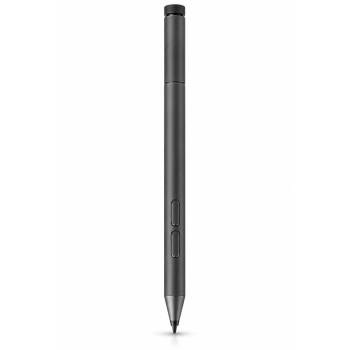
-63%
Brand: Lenovo
Model: Active Pen 2
Turn your Lenovo 2-in-1 into a precision creative workstation with the..
₹3,589.00 ₹9,658.00

-45%
Brand: Lenovo
Model: GX80K32884
The Lenovo Active Pen GX80K32884 transforms notebooks and tablets into..
₹2,989.00 ₹5,400.00

-47%
Brand: Lenovo
Model: lenovo LP-151
The Lenovo Precision Pen 2 LP-151 is a rechargeable stylus with up to ..
₹3,199.00 ₹6,000.00

-33%
Brand: Logitech
Model: Crayon
The Logitech Crayon Digital Pencil in vibrant Orange transforms your i..
₹4,999.00 ₹7,495.00

-40%
Brand: OnePlus
Model: OPN2502
The OnePlus Pad Go 2 Stylo OPN2502 is an 11.6-inch tablet with an IPS ..
₹2,999.00 ₹4,999.00

-25%
Brand: OnePlus
Model: OPN2504
The OnePlus Stylo Pro OPN2504 is a white stylus pen with 16,000 pressu..
₹4,099.00 ₹5,499.00

-70%
Brand: Printme
Model: stylus pen for tablet
Printme Creative Stylus Pen for Touch Screens — Long Battery Life, Uni..
₹449.00 ₹1,499.00

-50%
Brand: Redmi
Model: 56644
The Redmi 56644 Smart Pen is a stylus for Redmi Pad 2 and Redmi Pad 2 ..
₹2,999.00 ₹5,999.00

-61%
Brand: Apple
Model: Writer
The RENAISSER Stylus Pen for iPad — Writer solves the frustrations of ..
₹1,179.00 ₹2,999.00

-52%
Brand: Robustrion
Model: CapacitiveStylus-Silver
Summary
Meet the Robustrion Capacitive Aluminum Stylus Pencil — a prec..
₹478.64 ₹999.00

-70%
Brand: Samsung
Model: EJ-PS938BS
The Samsung Galaxy S25 Ultra S Pen solves the frustration of imprecise..
₹2,999.00 ₹9,900.00

-75%
Brand: Tukzer
Model: Tukzer 2-in-1 Capacitive
The Tukzer 2-in-1 Capacitive Stylus Pen V2.0 eliminates finger smudges..
₹229.00 ₹899.00

-88%
Brand: Tukzer
Model: Tukzer Active 2nd Gen
The Tukzer Active 2nd Gen Stylus turns your compatible iPad into a pre..
₹699.00 ₹5,999.00

-80%
Brand: Tukzer
Model: TZ-S2
The Tukzer TZ-S2 eliminates inaccurate taps, smudges and slow handwrit..
₹199.00 ₹999.00

-88%
Brand: Tukzer
Model: TZ-S1
The Tukzer TZ-S1 stylus solves the frustration of imprecise touch and ..
₹699.00 ₹5,999.00

-79%
Brand: Tukzer
Model: TZ-S2
The Tukzer Universal Stylus Pen TZ-S2 is designed for creators, note-t..
₹207.00 ₹999.00

-79%
Brand: Tukzer
Model: TZ-S2
The Tukzer TZ-S2 Universal Stylus Pen eliminates smudges, missed taps ..
₹209.00 ₹999.00

-88%
Brand: Virtutron
Model: 1011
The Virtutron 1011 universal stylus pen has a replaceable 1.5 mm condu..
₹499.00 ₹3,999.00

-23%
Brand: Xmate
Model: 250210001
The Xmate Stylus Pen solves the frustration of imprecise touchscreen i..
₹1,149.00 ₹1,499.00

-44%
Out Of Stock
Brand: HP
Model: x360
Transform your HP Spectre x360 into a precision creative studio with t..
₹1,689.00 ₹2,999.00