

Amkette Evo Gamepad Pro 4 Programmable Gamepad for Android | for Snapdragon Devices Only | with Touch Point Mapping (Black)





- Stock: In Stock
- Brand: Amkette
- Model: Gamepad Pro 4
- SKU: B0B4B7X1Z3
🎉 Our Customer Benefits 🎉
| 💸 12% Instant Discount | Use code VLE12 at checkout to get 12% Flat Discount |
| 🎁 ₹100 Wallet Credit | Get ₹100 credited to your wallet after successful order completion |
| 💼 GST Credit Available | Add your GST number at checkout to claim tax benefits. Update Now |
| ✅ Warranty Included | All products come with warranty for your peace of mind |
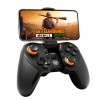
The Amkette Gamepad Pro 4 is a Bluetooth gamepad for Android phones with native gamepad support and touchscreen mapping for Snapdragon phones. Its Xbox-style layout includes analog triggers and quick-action back buttons. It suits Android players who want to use a controller with supported games or map controls for games without native gamepad support.
Key Highlights
- Bluetooth game controller for Android
- Native mode for gamepad-supported games
- Touch mapping for Snapdragon phones
- Xbox-style button layout
- Analog triggers
- Quick-action back buttons
Product Overview
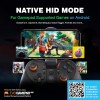
The Amkette Gamepad Pro 4 is an Android Bluetooth controller with two play modes. Native mode works with Android phones and games that already support gamepads. Touch Point Mapping mode maps controller buttons to touchscreen controls, enabling gamepad-style input in games that do not natively support a controller; this mode is for Snapdragon phones.
The controller has an Xbox-style layout, analog triggers and quick-action buttons on the back. Native mode is activated with Home + X, while Touch Point Mapping is activated with Home + A. The Evo Gamepad App is available on the Android Play Store, and the product information identifies more than 300 games with gamepad support. Setup videos and guides can be accessed by scanning the QR code behind the gamepad.
Features and Benefits
- Two Android modes – choose native gamepad support or touchscreen mapping.
- Native mode – play games that already support a gamepad.
- Touch Point Mapping – map controller buttons to touchscreen controls.
- Snapdragon support – mapping mode is for Snapdragon phones.
- Xbox-style layout – familiar controller button arrangement.
- Analog triggers – use trigger controls in supported games.
- Back buttons – quick-access controls for actions such as peeking or throwing grenades.
- Evo Gamepad App – available on the Android Play Store.
Technical Specifications
| Specification | Details |
|---|---|
| Brand | Amkette |
| Model | Gamepad Pro 4 |
| Product Type | Bluetooth gamepad |
| Compatibility | Android phones |
| Modes | Native mode and Touch Point Mapping mode |
| Touch Mapping Compatibility | Snapdragon phones |
| Controls | Xbox-style layout, analog triggers and quick-action back buttons |
| App | Evo Gamepad App available on the Android Play Store |
| Game Support | More than 300 games with native gamepad support |
| Country of Origin | India |
Who Should Buy This?
- Android gamers – use a Bluetooth controller with games that support gamepads.
- Snapdragon phone users – use Touch Point Mapping with games that lack native gamepad support.
- Players of native gamepad-supported games – use the controller's Native mode.
- Players who use quick-access controls – the gamepad has back buttons for actions such as peeking or grenade throws.
Compatibility
- Android phones with native gamepad-supported games.
- Snapdragon phones for Touch Point Mapping mode.
- Evo Gamepad App is available on the Android Play Store.
How to Set Up
- For Native mode, press Home + X.
- For Touch Point Mapping on a Snapdragon phone, press Home + A.
- Scan the QR code behind the gamepad to access setup videos and guides.
Pros and Limitations
Pros
- Offers both native gamepad and touchscreen mapping modes.
- Native mode supports Android phones with gamepad-compatible games.
- Touch Point Mapping can enable controller input in games without native gamepad support on Snapdragon phones.
- Includes analog triggers and quick-action back buttons.
Limitations
- Touch Point Mapping mode is for Snapdragon phones.
- Native mode applies to games that support gamepads.
Frequently Asked Questions
Which phones work with the Gamepad Pro 4?
Native mode works with Android phones. Touch Point Mapping mode is for Snapdragon phones.
Can it be used with games that do not support a gamepad?
Touch Point Mapping maps gamepad buttons to touchscreen controls for games without native gamepad support. This mode is for Snapdragon phones.
How do I activate Native mode?
Press Home + X to activate Native mode. It is intended for Android games that already support a gamepad.
How do I activate Touch Point Mapping?
Press Home + A to activate Touch Point Mapping on a Snapdragon phone. The mode maps controller buttons to touchscreen controls.
Does it have analog triggers?
Yes, the Gamepad Pro 4 has analog triggers. It also has an Xbox-style layout and quick-action back buttons.
Is there an app for the controller?
The Evo Gamepad App is available on the Android Play Store. It is associated with the Gamepad Pro 4.
Where can I find setup guidance?
Scan the QR code behind the gamepad to access setup videos and guides. The Home + X and Home + A button combinations select its two modes.
Which devices or systems does the Amkette Evo Gamepad Pro 4 work with?
It is listed for Android phones. If your device is not mentioned, check the connection type and specifications before ordering.
Warranty
1 year manufacturer warranty
| Country and Manufacturer | |
| Country of Origin | India |