
Hard Drive Enclosure
Hard Drive Enclosures at Vlebazaar help you connect a compatible internal drive for external use or fit a drive into a computer’s optical bay. Prices range from ₹131 to ₹2,949, with most products between ₹500 and ₹1,800. Browse options from Orico and Sounce, and check your drive’s size and connection before choosing.
Popular hard drives and SSDs by budget
Under ₹500
Portable backups and basic SSDs.
₹500 and above
Faster NVMe and larger portable drives.
How to choose hard drives and SSDs
- Match the enclosure to your drive: check whether it is a 2.5-inch SATA drive or an M.2 NVMe SSD.
- Confirm the drive’s interface and the enclosure’s supported interface; SATA and NVMe are different and are not interchangeable.
- Check the connection to your computer, such as USB Type-C or USB-A, and confirm you have a compatible port or cable.
- For an optical-bay caddy, check your laptop’s bay size and drive compatibility before buying.
- Consider how you will use the drive: a compact enclosure can suit carrying files, while a caddy is intended for a compatible laptop bay.
- Check whether the enclosure includes the cable or other parts you need; do not assume these are included.
- Keep important files in two places, since any drive can fail.
Hard drives and SSDs features explained
- SATA - SATA is a common connection for 2.5-inch SSDs and hard disks; the enclosure must support the drive’s SATA interface.
- M.2 NVMe - M.2 describes a drive’s form factor, while NVMe is its interface; check that an enclosure supports NVMe, not just M.2.
- USB Type-C - USB Type-C describes the connector shape, so check the enclosure and computer connection for compatibility rather than assuming speed from the connector alone.
Which hard drives and SSDs to buy for what
- For carrying files: look for an enclosure that matches your drive and offers a connection compatible with your computer.
- For accessing a 2.5-inch SATA drive: check that the enclosure supports the drive’s size and SATA interface.
- For an M.2 NVMe SSD: choose an enclosure specifically compatible with M.2 NVMe drives.
- For a laptop optical bay: check your laptop’s bay and drive fit before choosing a caddy.
Popular hard drives and SSDs brands
Related categories
- Action Camera
- Antivirus
- Audio Mixer
- AV RCA to VGA Adapter
- Bag
- Bags
- Bumper Laptop
- Bumper Smartphone Accessories
Hard drives and SSDs: frequently asked questions
What is the price of a hard drive enclosure at Vlebazaar?
Hard drive enclosure listings at Vlebazaar range from ₹131 to ₹2,949. Most products are priced between ₹500 and ₹1,800. Check the product listing for its current price and confirm compatibility with your drive before ordering.
Which hard drive enclosure is good under ₹500?
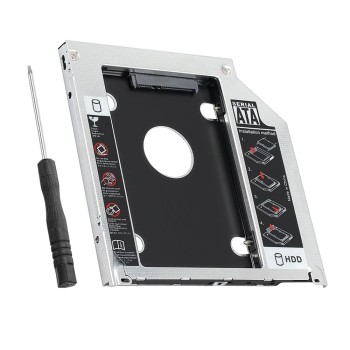
The Sounce 9.5mm Optical Bay Hard Drive Caddy SATA 2.5 inch is listed at ₹131. It is an optical-bay caddy, so check that your laptop has a compatible bay and that your drive matches the caddy before choosing it.
Which hard drive enclosure can I get for ₹500 and above?
Options listed include the ORICO 2.5'' Hard Drive Enclosure SATA to USB 3.0 HDD at ₹549, the ORICO 2.5 Type C Enclosure External SATA to USB3.1 Gen1 Hard at ₹749, and the ORICO M.2 NVMe SSD Enclosure at ₹1,779. Match the model to your drive.
Are Orico and Sounce hard drive enclosures available?
Yes. Vlebazaar lists hard drive enclosure products from Orico and Sounce. The listed products include Orico 2.5-inch and M.2 NVMe enclosure options, as well as a Sounce optical-bay caddy. Check each product’s compatibility details before buying.
How do I choose between a SATA and an M.2 NVMe enclosure?
First identify the drive’s interface and form factor. SATA enclosures are for compatible SATA drives, while an M.2 NVMe enclosure is for an M.2 drive that uses NVMe. The terms are not interchangeable, so check the drive and enclosure details carefully.
Will a USB Type-C enclosure work with any computer?
Not necessarily. Check that your computer has a compatible USB port or that you have a suitable cable, and confirm the enclosure supports your drive. USB Type-C refers to the connector shape; it does not by itself confirm compatibility or transfer speed.
Can I use an optical-bay caddy as an external drive enclosure?
An optical-bay caddy is intended to fit a compatible laptop optical bay, rather than serve as a standard external enclosure. Check your laptop’s bay and the caddy’s drive compatibility before buying. The Sounce 9.5mm Optical Bay Hard Drive Caddy is listed at ₹131.


![ORICO SATA to USB 3.0 External Hard Drive Enclosure for 2.5 HDD and SSD Below 9.5mm Thickness Up to 4TB UASP Supported [Hard Drive NOT Included] ORICO SATA to USB 3.0 External Hard Drive Enclosure for 2.5 HDD and SSD Below 9.5mm Thickness Up to 4TB UASP Supported [Hard Drive NOT Included]](https://vlebazaar.in/image/cache/catalog/ORICO-SATA-to-USB-30-External-Hard-Drive-Enclosure-for-25-HDD-and-SSD-Be/ORICO-SATA-to-USB-30-External-Hard-Drive-Enclosure-for-25-HDD-and-SSD-Below-95mm-350x350.jpg)

