

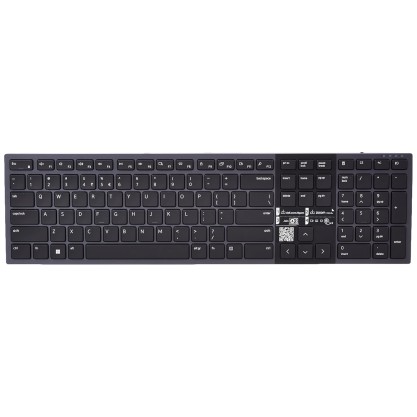
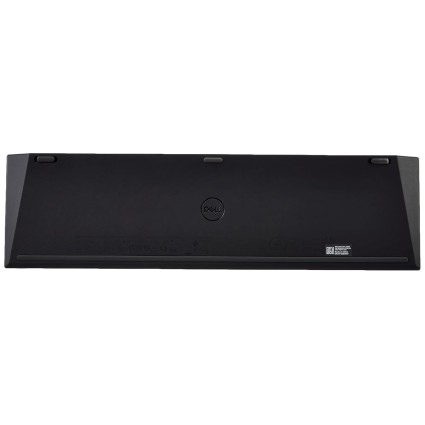
Dell-KB900, Premier Collaboration Keyboard (Backlit), with USB Wireless Receiver, Interfaces: 2.4 GHz, Bluetooth 5.1, Features: Mic Mute/unmute, Chat, Screen Share, Video on/Off
- Stock: Out Of Stock
- Brand: Dell
- Model: Dell-KB900
- SKU: B0CW6C9MVP
🎉 Our Customer Benefits 🎉
| 💸 12% Instant Discount | Use code VLE12 at checkout to get 12% Flat Discount |
| 🎁 ₹100 Wallet Credit | Get ₹100 credited to your wallet after successful order completion |
| 💼 GST Credit Available | Add your GST number at checkout to claim tax benefits. Update Now |
| ✅ Warranty Included | All products come with warranty for your peace of mind |
The Dell Dell-KB900 Premier Collaboration Keyboard is a backlit wireless keyboard with Bluetooth 5.1 and 2.4 GHz USB receiver connectivity. Dedicated keys control microphone mute, chat, screen sharing and video, making it suited to people who type and join online meetings across compatible computers.
Key Highlights
- Backlit keys for low-light typing
- Bluetooth 5.1 and 2.4 GHz connectivity
- Dedicated microphone and meeting controls
- Quiet scissor-switch-style keys
- Rechargeable battery with USB charging
- USB wireless receiver included
Product Overview
The Dell-KB900 is a wireless collaboration keyboard for work and online meetings. It connects through Bluetooth 5.1 or a 2.4 GHz USB wireless receiver, and its dedicated keys provide microphone mute/unmute, chat, screen share and video on/off controls. Backlit keys support typing in dim rooms, while quiet scissor-switch-style keys provide responsive typing.
Its rechargeable battery charges over USB. The keyboard is compatible with Windows, macOS, Linux and Chrome OS; collaboration keys are optimized for Windows-based apps. The package contains the keyboard, USB wireless receiver, USB charging cable and Quick Start Guide. Its Graphite / Black finish and soft-touch polycarbonate build suit a desk setup, while the receiver provides a wireless connection option for computers without Bluetooth.
Features and Benefits
- Meeting controls – Dedicated keys for microphone, chat, screen sharing and video
- Dual wireless connectivity – Choose Bluetooth 5.1 or the 2.4 GHz USB receiver
- Backlighting – Adjustable backlit keys support use in low-light rooms
- Quiet typing – Scissor-switch-style keys provide responsive typing
- Rechargeable power – Recharge the battery using USB
- Multi-system compatibility – Works with Windows, macOS, Linux and Chrome OS
Technical Specifications
| Specification | Details |
|---|---|
| Brand | Dell |
| Model | Dell-KB900 (Premier Collaboration Keyboard) |
| Product Type | Wireless collaboration keyboard |
| Colour | Graphite / Black |
| Connectivity | 2.4 GHz USB wireless receiver and Bluetooth 5.1 |
| Backlight | Adjustable backlit keys |
| Key Switch Type | Quiet scissor-switch style |
| Special Keys | Mic Mute/Unmute, Chat, Screen Share, Video On/Off |
| Battery / Power | Rechargeable battery with USB charging |
| Materials / Build | Polycarbonate with soft-touch finish |
| Compatibility | Windows, macOS, Linux, Chrome OS |
| Country of Origin | China |
Who Should Buy This?
- Remote workers – Meeting controls are available directly on dedicated keys
- Hybrid teams – Switch between Bluetooth 5.1 and a 2.4 GHz USB receiver
- People who work in dim rooms – Adjustable backlit keys support low-light use
- Frequent typists – Quiet scissor-switch-style keys provide responsive typing
- Multi-platform users – Compatible with Windows, macOS, Linux and Chrome OS
Compatibility
- Windows
- macOS
- Linux
- Chrome OS
- Collaboration keys are optimized for Windows-based apps
How to Set Up
- Connect using the included 2.4 GHz USB wireless receiver, or pair over Bluetooth 5.1.
- Use the included USB charging cable to charge the rechargeable battery.
What's in the Box
- Keyboard
- USB wireless receiver
- USB charging cable
- Quick Start Guide
Pros and Limitations
Pros
- Offers both Bluetooth 5.1 and 2.4 GHz receiver connectivity
- Includes dedicated microphone, chat, screen-share and video keys
- Has adjustable backlit keys
- Uses a rechargeable battery with USB charging
- Compatible with four listed operating systems
Limitations
- Collaboration keys are optimized for Windows-based apps.
Frequently Asked Questions
How does the Dell-KB900 connect to a computer?
It connects through Bluetooth 5.1 or the included 2.4 GHz USB wireless receiver. Choose either wireless connection method.
Which operating systems are compatible with this keyboard?
It is compatible with Windows, macOS, Linux and Chrome OS. Collaboration keys are optimized for Windows-based apps.
What meeting controls does the keyboard have?
It has dedicated Mic Mute/Unmute, Chat, Screen Share and Video On/Off keys. These controls are designed for meeting-related tasks.
Does the Dell-KB900 have backlit keys?
Yes, it has adjustable backlit keys for low-light use. The backlighting is part of the keyboard.
Is the keyboard rechargeable?
Yes, it has a rechargeable battery that charges over USB. A USB charging cable is included.
What is included with the keyboard?
The package includes the keyboard, USB wireless receiver, USB charging cable and Quick Start Guide. The receiver supports its 2.4 GHz wireless connection.
What type of keys does the Dell-KB900 use?
It uses quiet scissor-switch-style keys for responsive typing. The keys are also backlit.
Which devices or systems does the Dell-KB900 work with?
It is listed for Windows, macOS, Linux, Chrome OS. If your device is not mentioned, check the connection type and specifications before ordering.
Warranty
1 year manufacturer warranty
| Country and Manufacturer | |
| Country of Origin | China |