

HP DeskJet Ink Advantage 2338 All-in-One Printer, Print, Copy, Scan, Hi-Speed USB 2.0, Up to 7.5/5.5 ppm (Black/Color), 60-Sheet Input Tray, 25-Sheet Output Tray, 1000-page Duty Cycle, Color, 7WQ06B


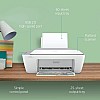
- Stock: In Stock
- Brand: HP
- Model: 2338
- SKU: B08D9NVJ6V
🎉 Our Customer Benefits 🎉
| 💸 12% Instant Discount | Use code VLE12 at checkout to get 12% Flat Discount |
| 🎁 ₹100 Wallet Credit | Get ₹100 credited to your wallet after successful order completion |
| 💼 GST Credit Available | Add your GST number at checkout to claim tax benefits. Update Now |
| ✅ Warranty Included | All products come with warranty for your peace of mind |
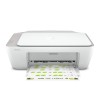
The HP DeskJet Ink Advantage 2338 is an inkjet all-in-one printer for printing, copying and scanning, with Hi-Speed USB 2.0 connectivity and print speeds up to 7.5 ppm in black and 5.5 ppm in colour. Its 60-sheet input tray suits everyday document tasks at home or in a small office.
Key Highlights
- Print, copy and scan functions
- Inkjet printing with HP Ink Advantage
- Up to 7.5 ppm black, 5.5 ppm colour
- 60-sheet input and 25-sheet output trays
- Hi-Speed USB 2.0 connection
- Flatbed scanner with up to 1,200 dpi optical resolution
Product Overview
The HP DeskJet Ink Advantage 2338 combines printing, copying and scanning in one inkjet printer. It prints at up to 7.5 pages per minute in black and 5.5 pages per minute in colour, with a 60-sheet input tray and a 25-sheet output tray. A flatbed scanner provides up to 1,200 dpi optical resolution, while the maximum colour print resolution is up to 4,800 x 1,200 optimized dpi with driver enhancement.
Connect the printer through Hi-Speed USB 2.0; the cable is not included. It uses HP Ink Advantage black and tri-colour cartridges and has a duty cycle of up to 1,000 pages per month. The printer is mains powered and is compatible with Windows and macOS, with basic support for common Linux distributions. It is suited to home and small-office users who need printing, copying and scanning through a USB connection. The box includes setup ink cartridges, a power cord.
Features and Benefits
- All-in-one functions – Print, copy and scan with one device.
- Inkjet technology – Uses HP Ink Advantage cartridges.
- Black print speed – Prints up to 7.5 pages per minute.
- Colour print speed – Prints up to 5.5 pages per minute.
- Paper input – Holds up to 60 sheets in the input tray.
- Paper output – Output tray holds up to 25 sheets.
- Colour resolution – Up to 4,800 x 1,200 optimized dpi with driver enhancement.
- Flatbed scanning – Optical scanner resolution reaches up to 1,200 dpi.
- USB connectivity – Connects through Hi-Speed USB 2.0.
Technical Specifications
| Specification | Details |
|---|---|
| Brand | HP |
| Model | DeskJet Ink Advantage 2338 (7WQ06B) |
| Product Type | All-in-one inkjet printer |
| Functions | Print, copy, scan |
| Print Technology | Inkjet (HP Ink Advantage) |
| Print Speed | Up to 7.5 ppm (black) / 5.5 ppm (colour) |
| Maximum Print Resolution | Up to 4,800 x 1,200 optimized colour dpi (driver-enhanced) |
| Scanner | Flatbed; up to 1,200 dpi optical resolution |
| Input Tray Capacity | 60 sheets |
| Output Tray Capacity | 25 sheets |
| Duty Cycle | Up to 1,000 pages per month |
| Connectivity | Hi-Speed USB 2.0 |
| Cartridges | HP Ink Advantage black and tri-colour cartridges |
| Power | Mains powered |
| Compatibility | Windows and macOS; basic support for common Linux distributions |
| Build | ABS plastic chassis with matte finish |
| Country of Origin | China |
Who Should Buy This?
- Home users – Need print, copy and scan functions in one printer.
- Small-office users – Want an inkjet printer with black and colour print speeds up to 7.5 ppm and 5.5 ppm.
- Users with USB-connected setups – Can connect through Hi-Speed USB 2.0.
- Users who scan documents – Can use the flatbed scanner with up to 1,200 dpi optical resolution.
Compatibility
- Windows and macOS; driver available.
- Basic support for common Linux distributions.
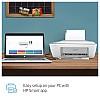
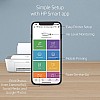
How to Set Up
- Connect the printer to mains power using the included power cord.
- Use the included setup ink cartridges.
- Connect through Hi-Speed USB 2.0; the USB cable is not included.
- Use the getting started guide for setup information.
What's in the Box
- Printer
- Setup ink cartridges
- Power cord
- Getting started guide
- Warranty card
Pros and Limitations
Pros
- Combines print, copy and scan functions.
- Provides black and colour printing.
- Includes setup ink cartridges and a power cord.
- Supports Windows and macOS, with basic support for common Linux distributions.
Limitations
- USB 2.0 cable is not included.
- Connectivity is Hi-Speed USB 2.0.
Frequently Asked Questions
What functions does the HP DeskJet Ink Advantage 2338 provide?
It prints, copies and scans. It uses inkjet technology with HP Ink Advantage cartridges.
What are its print speeds?
It prints up to 7.5 pages per minute in black and 5.5 pages per minute in colour.
Does this printer connect wirelessly?
The specified connection is Hi-Speed USB 2.0. The USB cable is not included.
How much paper do the trays hold?
The input tray holds up to 60 sheets, and the output tray holds up to 25 sheets.
What is the scanner resolution?
The printer has a flatbed scanner with up to 1,200 dpi optical resolution. This is the specified optical resolution.
Which operating systems are supported?
Compatibility includes Windows and macOS, with drivers available. There is also basic support for common Linux distributions.
What comes in the box?
The box includes the printer, setup ink cartridges, a power cord, a getting started guide and a warranty card. A USB cable is not included.
What is the printer's monthly duty cycle?
Its duty cycle is up to 1,000 pages per month.
Warranty
1-year manufacturer warranty.
| Country and Manufacturer | |
| Country of Origin | China |
| General | |
| Brand | HP |
| Condition | New |
| Specifications | |
| Warranty | 1 year manufacturer warranty |