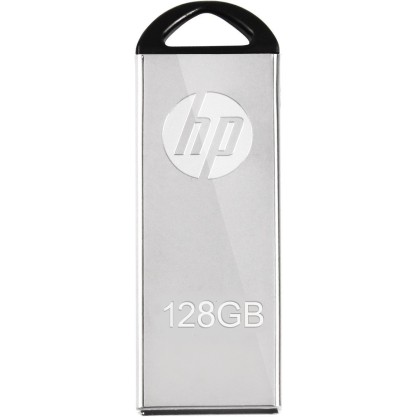

HP v220w 128 GB Pen Drive (Silver)


-66%
Out Of Stock


🎉 Our Customer Benefits 🎉
| 💸 12% Instant Discount | Use code VLE12 at checkout to get 12% Flat Discount |
| 🎁 ₹100 Wallet Credit | Get ₹100 credited to your wallet after successful order completion |
| 💼 GST Credit Available | Add your GST number at checkout to claim tax benefits. Update Now |
| ✅ Warranty Included | All products come with warranty for your peace of mind |
The HP v220w 128 GB Pen Drive solves the everyday challenge of carrying large files securely and instantly. Store presentations, photos, videos and backups in a sleek, pocket-friendly metal body that feels solid and looks premium. Whether you’re transferring work documents or saving holiday memories, it delivers reliable portability with peace of mind — backed by a manufacturer warranty and Vlebazaar’s trusted customer support and secure delivery. Count on fast plug-and-play convenience, durable build quality, and Vlebazaar’s dependable after-sales service for a worry-free ownership experience.
- 128 GB ample storage — keep more files, photos and media within reach.
- Sleek silver metal finish — premium look and satisfying tactile durability.
- Compact, pocket-friendly design — carry conveniently wherever you go.
- USB interface for quick transfers — hassle-free plug-and-play convenience.
- Secure file portability — perfect for work, study and travel backups.
- Reliable data retention — built for daily use and frequent transfers.
- Low power draw — works silently without draining device battery.
- Works across devices — broad compatibility with laptops, desktops and select smart devices.
- Lightweight comfort — minimal bulk, maximum convenience for on-the-go use.
- Trusted HP quality — consistent performance you can depend on.
| Specification | Details |
|---|---|
| Model | HP v220w |
| Brand | HP |
| Capacity | 128 GB |
| Colour | Silver |
| Interface | USB (Plug-and-play) |
| Performance | Optimized for reliable transfers; actual speeds depend on host device and file types |
| Compatibility | Windows, macOS, Linux and devices supporting USB mass storage |
| Material / Build | Metal casing with durable finish |
| Dimensions | Compact form factor — pocket-friendly (manufacturer spec) |
| Weight | Lightweight — easy to carry |
| Warranty | 1 year manufacturer warranty |
| Box Contents | HP v220w 128 GB Pen Drive, Documentation |
| Operating Temperature | Standard USB device operating range |
| Power Requirement | Powered via USB port — no external power needed |
| Use Case | File transfer, backup, media storage, document portability |
- Verified products and authentic HP warranty coverage.
- Secure checkout, fast shipping and careful packaging to protect your drive.
- Responsive customer support to help with setup, returns and warranty claims.
- Transparent product details and honest reviews to make confident choices.
- Reliable after-sales service and assistance across India.
- Students and professionals needing portable storage for documents and projects.
- Photographers and content creators wanting a compact backup solution.
- Frequent travelers who require secure, lightweight data transport.
- Anyone upgrading from smaller drives to a roomy 128 GB capacity.
- Q: Is the HP v220w plug-and-play?
- A: Yes — it supports plug-and-play on most Windows, macOS and Linux systems that recognize USB mass storage devices.
- Q: Will it work with smart TVs and car stereos?
- A: Many smart TVs and car media players support USB drives. Check your device’s supported file systems and USB compatibility for best results.
- Q: How durable is the metal casing?
- A: The metal finish provides enhanced scratch resistance and a premium feel; treat it like any portable device to avoid extreme impacts.
- Q: Can I use it to run portable applications?
- A: Yes — you can store and run portable apps, though performance depends on the host device’s USB speed and system resources.
- Q: What warranty support is included?
- A: This product comes with a 1 year manufacturer warranty. Vlebazaar assists with warranty claims and support for a smooth resolution.
- Q: How do I format the drive for compatibility?
- A: You can format the drive using your computer’s disk utility. Choose exFAT for cross-platform compatibility or NTFS/FAT32 depending on your device needs; backing up data before formatting is recommended.